Get from a full card to finished photos

Aphera is thoughtfully designed with just the right tools, so you can focus on making great images. See the Method for our approach to editing.

Keyboard-first

Dedicated keys for ratings, balance, and looks. Keep your eyes on the image.
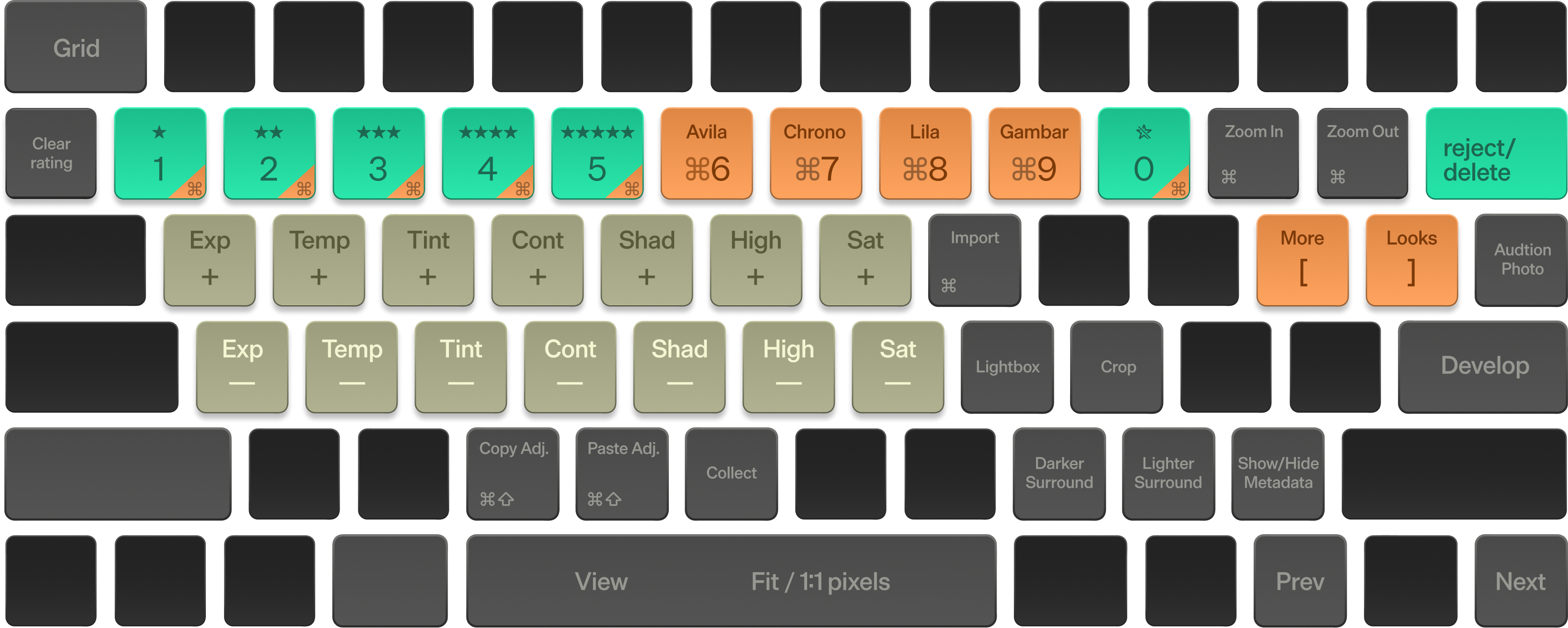
Aphera's keyboard shortcuts for Ratings and Culling, Balance Controls, and Assignable Looks, mapped across the number row, home row, and modifier keys

Ratings + Culling

1–5 to rate, ⌥⌫ to reject.

Balance Controls

Exposure, Temperature, Tint, Contrast, Shadows, Highlights, and Saturation on Q–U and A–J.

Assignable Looks

Build your own palette of styles, ⌘1–9 applies a look to selected photos.

Everything Else

Switch modes, control your view, copy/paste adjustments and more.

Ratings and rejects
Star and reject; the Starred view shows photos by rating
Balance
Photometric controls applied before image formation. Hold Shift for 3× steps, Option for ⅓
Looks on keys
Assign looks to ⌘1–9; a look applies its image formation and effect layers in one step
Copy and paste adjustments
Copy and paste selected adjustments, or apply Balance or adjustments from the previous photo (⌘B, ⌘J)
Filter by rating
Show at least or exactly N stars in the grid
Groups
Sets of photos within a project that you can filter by rating
Collect to a group
Press B to add or remove photos from the group you're collecting into
Before/after
Hold \ to see the original, or turn on View › Before Edits
Modes
Switch between Grid, View, Develop, and Crop with one key (Esc, Space, Return, K)
Configurable keys
Split the number row between ratings and looks, or give it to either

Speed that keeps you moving

Aphera decodes and caches photos in the background, with performance tuned for your Mac's memory and disk. Edit one image or hundreds at once.

Import speed
100 RAW photos (100MP each) import in about a minute on an M2 Max
Bulk operations
Apply edits, ratings, or exports to hundreds of selected photos at once
Grid priority
Scrolling takes priority over background work such as importing
Adaptive caching
Memory and disk caches sized from your Mac's RAM and disk
Tunable performance
Set decode concurrency, memory cache, and disk cache yourself — defaults come from your Mac's hardware, with live memory stats
Apple Silicon
Built for Apple Silicon with Metal processing

Colors that feel alive

Film-inspired colors and handcrafted looks bring authentic analog character to digital files. Your images look great right away, and even better with a few quick edits.

Solaris before Solaris after
Avila before Avila after
Chronostasis before Chronostasis after
Lila before Lila after
Gambar before Gambar after
Verra before Verra after
Looks
Built-in looks, plus your own — a look stores the image formation and effect layers
Looks as references
Update a look and every photo using it changes
Import and export looks
Looks belong to a project; move them between projects as .apheralook files
Image Pipeline
From-scratch design from RAW to display. Scene-referred with tooling in a fixed order: Input, Balance, Formation, then effect layers you control.
Image Formation
Aphera's 2499, or your own LUT
Film Response
12 base curves, from Cinema Negative and Classic Print to Instant Film and Strong B&W, plus split toning for shadows and highlights
Grading
Video-style primary grading — contrast, pivot, saturation, gain/power/lift/offset, and targeted highlight/shadow control
Color Controls
A dedicated skin-tone control, plus independent hue, saturation, and luminance for red, yellow, green, cyan, blue, and magenta
White Balance
A creative warm/cool layer, separate from photometric temperature controls in Balance
Texture effects
Grain, halation, and diffusion
Vignette
Optical (lens-style) or Print (darkroom-style), with Temp and Tint to color it
Sharpen
Frequency-aware sharpening with halo and grain-overshoot reduction
Film and cinema LUTs
Fujifilm's GFX Eterna Film Simulation LUTs, or cinema LUTs in log formats from ARRI, RED, Sony, Canon, Panasonic, Apple, Fujifilm, and DaVinci, plus ACES
Scopes
Histogram, Waveform, and Color scopes above the pipeline in Develop
Crop
Aspect ratios, straighten, and 90° rotation
Perspective correction
Guided or manual correction of converging lines, with Auto Crop to keep the frame filled, and desqueeze for anamorphic lenses
Lens corrections
Embedded lens data, DNG profiles, or Lensfun, for distortion and vignetting.
RAW controls
Denoise and highlight recovery
Choice of RAW engine
Decode each photo with Apple's engine or Aphera's
Balance presets
Fixed white balance values for known light sources

Import to Export

Repeatable systems for import, editing, and export keep your work quick and consistent. Set up once and use on every project.

Projects
Each project references photos on disk; projects can overlap, and removing one doesn't touch your photos
Non-destructive editing
Original files are never modified
Supported formats
Most camera RAW formats and DNG, plus JPEG, HEIC, TIFF, and PNG
RAW + JPG pairs
Shoot both and they import as one photo — switch source files anytime, each keeps its own edits
Resilient imports
Files are tracked by macOS bookmark, so renames and moves resolve automatically — relink in place if a drive goes missing
Four-tier removal
Remove from a group, reject (a soft hide), remove from the project, or move the file to the Trash — undo any of it
Zoom
Fit to View (three insets) or Pixel Accurate, 25%–400%
Lightbox
A full-screen view of the photo without the interface — opens on a second display if you have one
Surround color
Set the color around the photo while you edit
Export presets
Archival, Web, Social, or your own
Export formats
JPEG, HEIC (8/10-bit), PNG and TIFF (8/16-bit)
Export settings
Color profiles (sRGB, Adobe RGB, Display P3, BT.2020, ProPhoto RGB) and output size
Naming patterns
Tokens for naming projects and exports

More time looking at the photo. Less time fighting the tool.

No credit card or account required. Requires macOS 15+ and Apple Silicon.