
Sometimes photos belong together for reasons a star rating doesn’t capture: the six frames for a couple’s preview the night of the wedding, a sequence for a carousel post, every portrait from an event, or a shortlist of contenders to compare before choosing one.
In Aphera 1.6, you can collect these with the B key. Press it and the selected photos go into a group. That’s the whole feature.
Quick Collection
As a long-time user of Lightroom Classic, I loved its Quick Collection feature: it’s versatile because it doesn’t label what’s in it; you throw photos in and decide later what they’re for. Its weakness is that it’s one-per-catalog, and a Lightroom catalog often holds tons of unrelated photos. That makes it temporary: you’re always clearing it out to pull a new set of photos together.
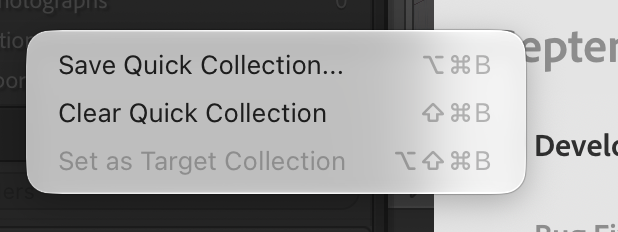
Lightroom sees this, and adds yet-more features to make it feel like a system: Save Quick Collection… turns it into a regular collection, and Clear Quick Collection empties it for the next task. Did you know that Quick Collection is only the default for a larger Target Collection feature? You can assign the B key to any collection in the catalog. Powerful? Yes, but it further complicates what happens to photos when you press the key, and where you go to find them.
All things considered, it’s a great feature because the B key becomes instinctual. I wanted something similar in Aphera: a way to collect photos using the keyboard, without changing their star rating.
We ended up with something great, and even borrowed the B key: it’s easy to reach, and LrC users already have the muscle memory.1
Failed attempt
In our first design of the feature, we thought each project should have at least one group. We called that group “Picks”, and set it as the target for B. It seemed like a good place to start.
In use, it immediately caused decision fatigue. On a first culling pass, I couldn’t decide whether to pick a photo or star it. I tried to keep stars and picks in sync, and failed miserably. The name Picks implies a purpose, and that purpose is too similar to star ratings. For me, it really clarified that the act of collecting is very different than rating, even if they sometimes overlap.
Names matter
Projects now start without any groups. The first time you press B, Aphera asks for a name, creates the group, and adds the selected photos to it.
This simple act of naming is important: it states why you’re collecting. A group called “Preview for Sam & Alex” doesn’t compete with stars the way Picks did. Of course, you’re free to call a group Picks, Selects, or anything you like. That’s fine; the name comes from your intent, not from ours.
Once assigned, B goes to the group marked with the collect icon in the sidebar. To change it, right-click another group and choose Collect Here. Any group can be used for collecting, and there is no separate Quick Collection. That means B has one meaning: send to the group you assigned.
Since groups are part of each project, there’s nothing to clear when you start the next one.
A few more details:
- When the selected photos are all in the group, B removes them.
- Ctrl+G shows the group you’re collecting into.
- Organize > Collect into lists every group. Choosing one sets it as the target and adds the selected photos.
See Collecting Photos.
Stars rank, groups collect
When we redesigned culling for Aphera, we found ourselves using a baseline single ★ to collect. That works for some people, and for a while it did for us too, until it didn’t. But, it just didn’t quite feel right — a little nagging crept up. Stars say how good a photo is. We like that distinction, and for some, they need that distinction, including ourselves.
With groups and collecting into them, a group’s name says what it’s for. It feels purposeful, and you can assign any purpose to a group at whenever you need or like — whether it’s hyper specific, a loose grouping, or thematic.
And that feels right to us.
Also shoutout to Capture One’s Selects (command-J), Photo Mechanic’s tag (T), and Apple Photos’ Favorite (.) for further inspiration. ↩︎